
 | Microsoft .NET Application Crashes Over Network - Part 1 |

Have you just created a Microsoft .NET application in VB.NET or C# and deployed it to a customer. They install it over the network and all of a sudden, it crashes for no apparent reason and gives no hint as to why?
However, when you run the application locally or on a computer or the one that you developed it on, it works fine.
Granted, you may have something programmed incorrectly like a path to a database or something. But before pulling your hair out trying to figure out what you did wrong in the programming one thing you may want to check first is the security policy of the .NET framework. Without the correct permissions, .NET applications may give you a very hard time when running over the network.
Here is Part 1 of the article. Click Here for Part 2 of the article
However, when you run the application locally or on a computer or the one that you developed it on, it works fine.
Granted, you may have something programmed incorrectly like a path to a database or something. But before pulling your hair out trying to figure out what you did wrong in the programming one thing you may want to check first is the security policy of the .NET framework. Without the correct permissions, .NET applications may give you a very hard time when running over the network.
Here is Part 1 of the article. Click Here for Part 2 of the article
|
Here is how to check it:
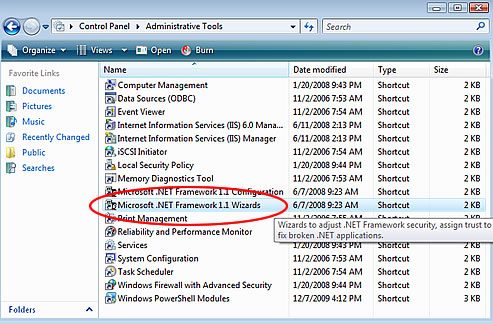
1. Go to "Start" -> "Settings" -> "Control Panel" -> "Administrative Tools"
2. Next Double-Click on ".NET Framework Wizard x.x" where x is the version #
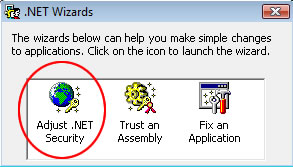
2. A screen like the following will display. From here you want to click on "Adjust .NET Security"
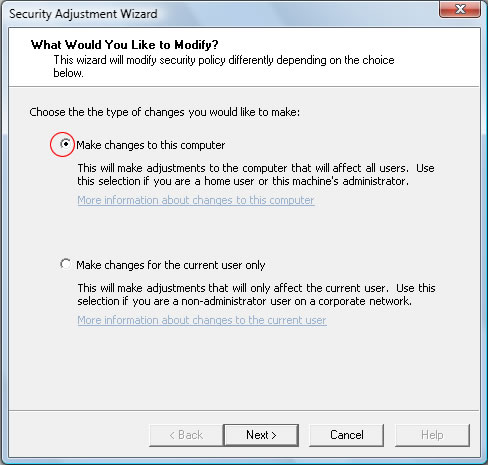
3. A wizard screen will display asking you if you would like to make a change to the computer or user. From here, you select "Make changes to this computer." and click "Next". This will bring you to the following screen:
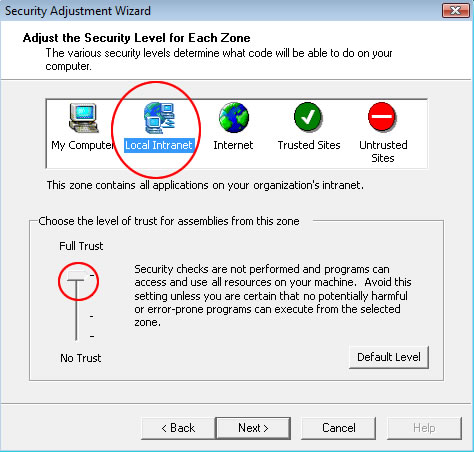
4. From here, you want to click on "Local Intranet" and then move that bar all the way up to "Full Trust". You can also click on "My Computer" and move the bar all the way up to "Full Trust" as well. To finalize these changes, click "Next" and then "Finish"!
5. Make sure you change this security setting on the server and all workstations that you plan on using the application. Now try running your application over the network and see if you still get a strange error. If you still get this error, you may need to repeat step 3 this time clicking on: "Make changes for the current user only."
Try running the program and hopefully this fixed the problem!
*** If it didn't fix the problem, please refer to the article Microsoft .NET Application Crashes Over Network - Part 2 or Microsoft .NET Application Crashes Over Network - Part 3 and follow the steps. This subsequent articles will allow you to set the permissions per "EXE" file depending on the administrative right from which you logged on to Windows. ***
This type of problem can be found on Windows XP, Windows Vista, Windows 7 or Windows 2003, Windows 2008 Server (32 or 64 bit versions).