
 | Yahoo Store: Simplify Adding Multiple Items to Cart at Once |

This article will explain how to program your Yahoo Store so a shopper can click on multiple items and add them all to the shopping cart with one simple "add-all-checked-to-cart" button click.
This article is intended for someone who already has experience progamming Yahoo Store and is familiar with Yahoo's documentation and basic store tags and understands HTML fields. An example of a basic Yahoo store-tag is simply to view the shopping cart within an link.
More information about store tags can be found here
If you call Yahoo support, that might be a problem...
The front line support staff is very good at what they do but they may not be able to help you with this issue. I already talked to Yahoo tech support but this is a very advanced undocumented feature of Yahoo store that required a lot of research and digging to figure out and a lot of web designers/programmers do things differently.
This article is intended for someone who already has experience progamming Yahoo Store and is familiar with Yahoo's documentation and basic store tags and understands HTML fields. An example of a basic Yahoo store-tag is simply to view the shopping cart within an link.
More information about store tags can be found here
If you call Yahoo support, that might be a problem...
The front line support staff is very good at what they do but they may not be able to help you with this issue. I already talked to Yahoo tech support but this is a very advanced undocumented feature of Yahoo store that required a lot of research and digging to figure out and a lot of web designers/programmers do things differently.
|
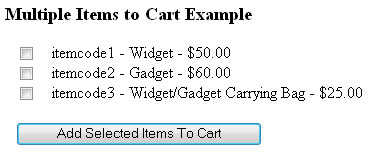
Anyway, here is the example on how to add multiple items to the shopping cart with one single add to cart click. Remember, you will need to make sure the itemcode is replaced with an item code that is in your catalog manager and that the prices match.
 |
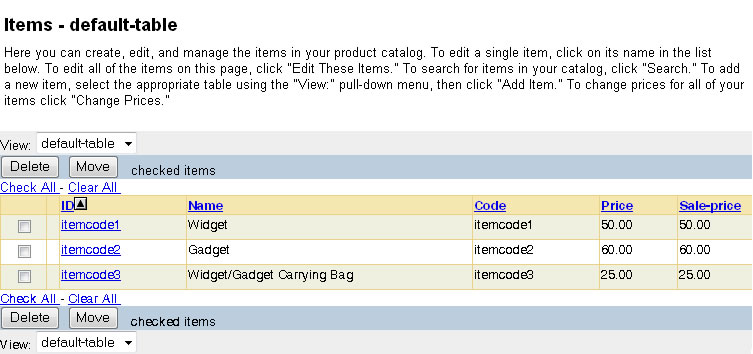
STEP 1: Create several items in the catalog manager. See below. Make sure you assign unique ID code's to each item. These ID's will be used in the next section of code just like when buying one item at a time.
Once you are finished, make sure you publish your changes.
STEP 2: Use the following code below. Please take special note of how this is layed out.
 First, you have special yahoo cart tag in the 'action' section of the form tag. Second, each checkbox must have a special name starting with "vwitem##" where ## is a sequential #. Third, note the item Id is in the checkboxes value clause matching same as catalog manager.
Also make sure item descriptions and prices match that of catalog manager
Forth, toward the bottom, you have this hidden field: .This field is an undocumented feature of Yahoo store (at least I can't find it...)
Finally, at the bottom, you have your standard input submit buttom. You can also use javascript: document.frmmain.submit();Once you have added and published your catalog items, try cutting and pasting the code below into a .html form and upload it to your yahoo store web hosting ftp. This is a basic form listing several items from which you can add them one by one or collectively to the shopping cart.
Well, there you have it, a multi-select add-to-cart functionality for Yahoo Store shopping cart programming.
Just make sure that you code your items with the correct ID, descriptions, and prices.
Remember, other website companies won't tell you how to do this in the first place, so keep this in mind when looking for someone to work with when starting an online store. It is pretty easy once you know how to do it.
| Your Feedback | |
| 10/29/2012 - Thanks! Im sure this saved me days of work. I was able to take it one step further and accept a quantity for each item also. Field vwquantityxx where xx is sequence number. - Don |