
 | Disable Windows XP Message "Publisher Could Not Be Verified" |

When running an executable file do you ever get this message from Windows XP - "The Publisher Could Not Be Verified"? If it happens one time, it will happen every time you try to run an executable file that Windows deems is not safe.
It is a built in security thing with Windows.
PLEASE NOTE: If you are unable to see the options or follow the steps below on newer systems running Windows 7 / Windows Vista there is an alternate way of removing this message by clicking here
PLEASE NOTE: If you are unable to see the options or follow the steps below on newer systems running Windows 7 / Windows Vista there is an alternate way of removing this message by clicking here
Here is a step by step tutorial to get rid of this message:
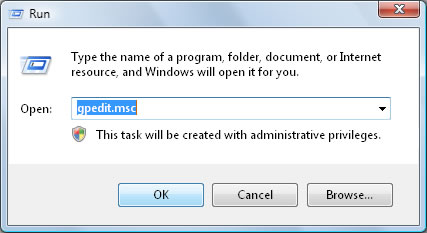
Step 1: Click Start>Run and type gpedit.msc. Click OK.
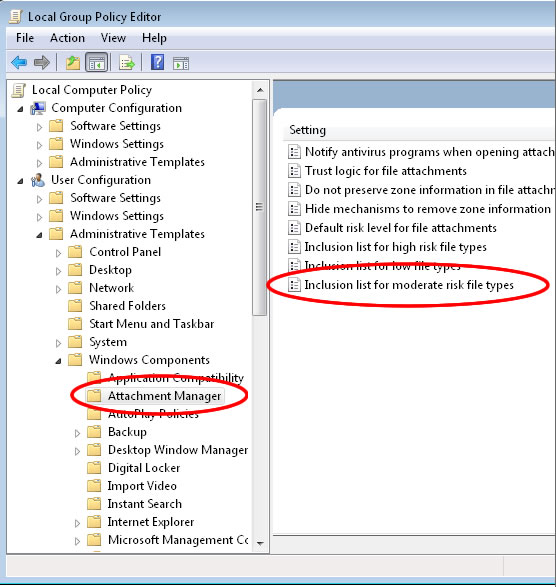
Step 2: Go to User ConfigurationAdministrative Templates Windows Components Attachment Manager. Double-Click on "Inclusion list for moderate risk file types" setting and click apply.
Step 3: Add "*.exe" to the "Inclusion list for moderate risk file types" setting. You can also add other file types.
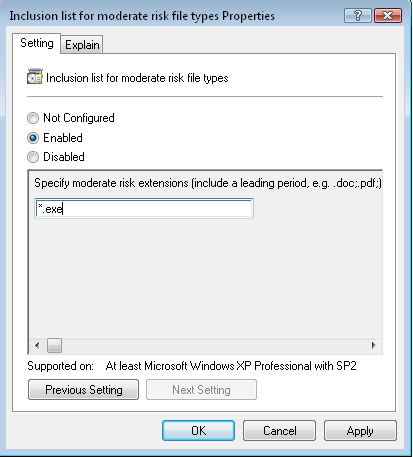
This should disable the "Publisher Could Not Be Verified" messages from appearing for that file type in the future.
| Your Feedback | |
| 04/11/2012 - its useful, tnx - mh |