

Now there is a simple point-of-sale software package for the Bowling Pro Shop along with other businesses!
POS Pro Shop is a simple, easy to use program that works with Microsoft Windows to allow you to maintain customers, take orders, track inventory and run a variety of reports. It is designed for quick access at your fingertips using simple key strokes, the mouse or a barcode scanner. Our software is fully compatible with the latest 64-bit Windows 7, 8 and 10 technology!
POS Pro Shop is a simple, easy to use program that works with Microsoft Windows to allow you to maintain customers, take orders, track inventory and run a variety of reports. It is designed for quick access at your fingertips using simple key strokes, the mouse or a barcode scanner. Our software is fully compatible with the latest 64-bit Windows 7, 8 and 10 technology!
| For information about our Bowler Hand Measurement Software, please click here | 
|
This central screen is your operational hub, facilitating sales orders and seamless navigation across program sections. Whether you prefer using a keyboard, mouse, or barcode scanner, this interface adapts to your chosen method, ensuring smooth interaction. It's more than just a screen; it's a tool for efficiency. With every order placed and each section accessed, you're driving streamlined operations and mastering your workflow. This is where sales orders take shape, and program exploration begins – a balance between technology and usability.
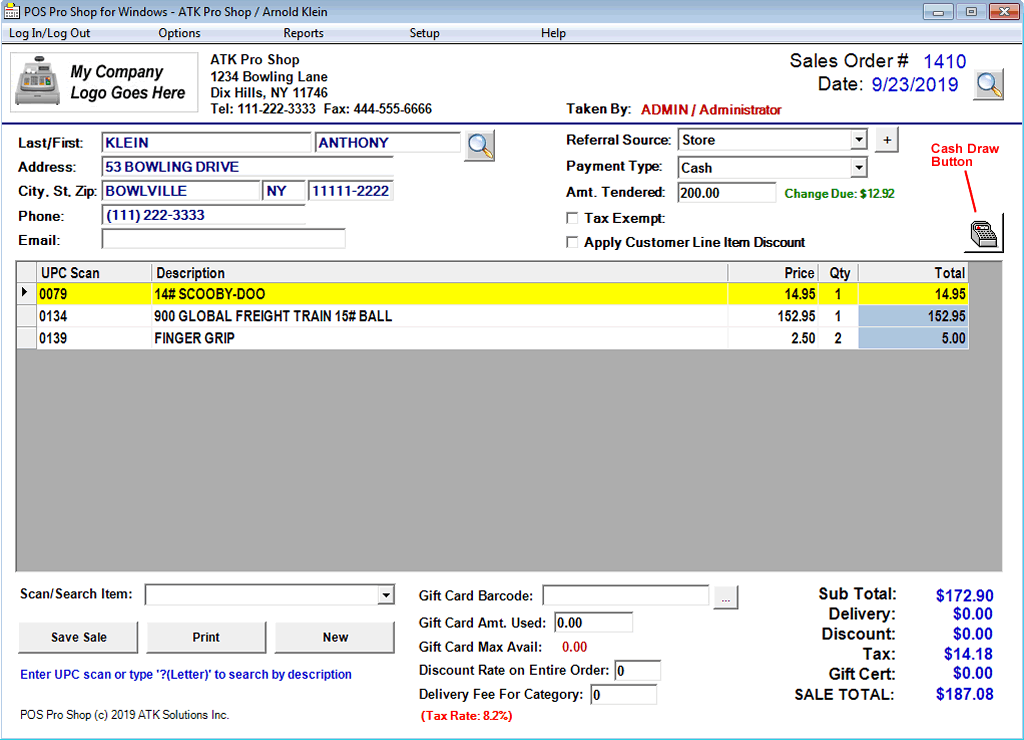
POS Pro Shop Features:
 Create Sales Orders Maintain/Track Inventory Sales Order Reports Inventory Reports Re-Order Level Report End of Day Report Priority Customer Item Discount Print Sales Receipts Open Cash Drawer Shows Amount Tendered Calculates Cash Due Inventory Categories Referral Sources for Marketing Attach Company Logo Tax Exempt Sales Works with a Bar Code Scanner Entire Order Discounts User/Password Access Delivery Fees/Discount Rate Create/Track Gift Cards Export Reports to Excel CSV Link to AKM Pro Shop Customers Backup Database Restore Database
Additional POS Pro Shop Screens.......
Select Sale/Invoice Screen
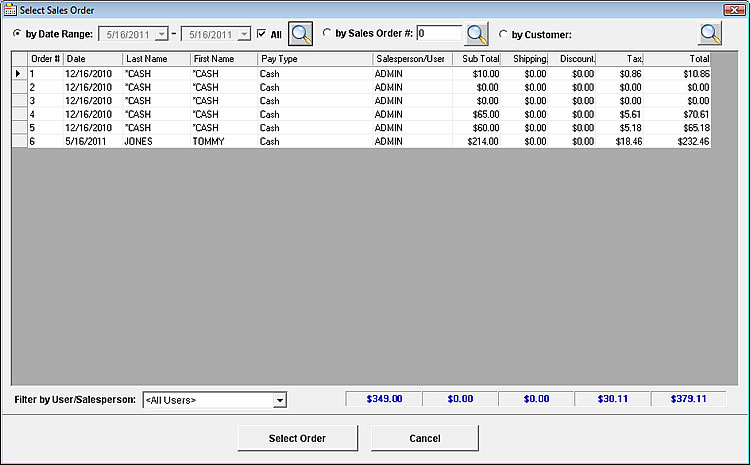
Upon completing an invoice or sale, you're seamlessly ushered into a realm of efficiency through our user-friendly interface. This screen stands as a versatile command center, allowing effortless retrieval and management of your transactions. Gone are the days of tedious searching – whether you need to revisit a specific invoice or access a comprehensive sales record, this screen ensures quick and convenient access. But its capabilities extend beyond retrieval: it empowers you to export data in a format that suits your requirements, streamlining internal processes and reporting. Yet, its true power lies in its ability to offer insights; visualize trends, patterns, and make informed decisions. This screen is the epitome of post-sale convenience, saving you time while amplifying your control over data, ultimately leading to more informed actions and strategic growth.
Add/Edit Inventory
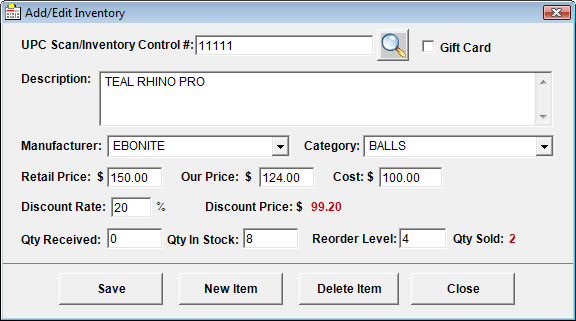
Not only can you seamlessly manage items by adding, editing, or removing them with precision, but you're also endowed with the capability to finely tune stock levels as incoming items find their place. This interface isn't merely a gateway to transactions; it's a strategic vantage point. From refining product details to adjusting stock quantities, you're equipped to align your inventory with your business's evolution. Beyond operational finesse, it offers insights into trends and performance, enabling you to make informed decisions that drive growth. As you wield this interface, you're not just managing inventory – you're sculpting a thriving business ecosystem.
Select Product from Inventory
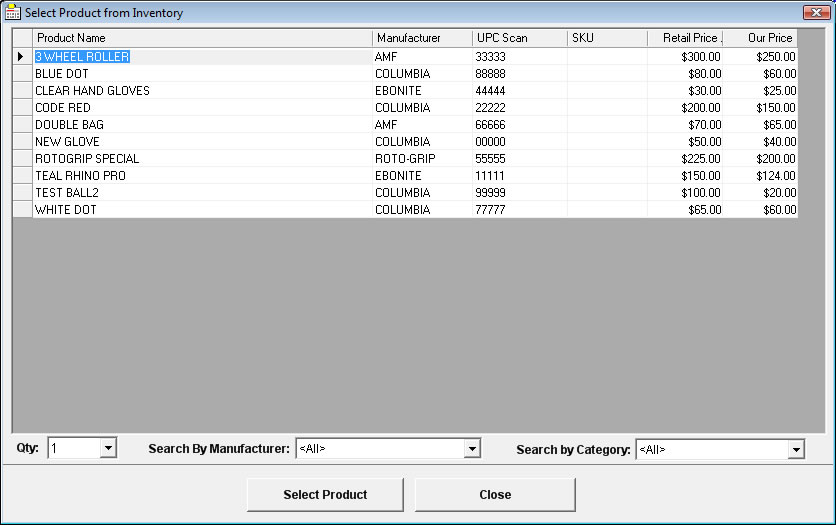
Seamlessly integrated into your order-taking process, this straightforward pop-up grid offers a gateway to precise item retrieval. No frills, just straightforward efficiency. With every interaction, you're seamlessly guided toward finding the exact item you need, effortlessly ensuring that your orders are accurate and timely. This is more than a screen; it's a tool for precision. A realm where you traverse through your inventory with ease, ensuring that your customer's needs are met with the right products, every time.
Edit Customer Screen
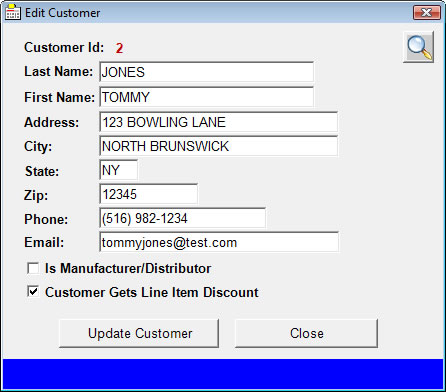
After successfully saving an order, you retain the power to adapt and refine the customer information as circumstances evolve. This flexibility extends beyond the initial transaction, allowing you to seamlessly update customer details right from this point of control. Whether it's a change in contact information, billing details, or shipping preferences, you can effortlessly ensure that your records remain accurate and up-to-date. This interface becomes your ally in maintaining the integrity of your customer database, ensuring that your interactions are informed and personalized, even in the face of change. Embrace the empowerment to revise and enhance customer information from a single focal point, embodying efficiency and ensuring a seamless customer experience across the board
Inventory/Item Sales Report
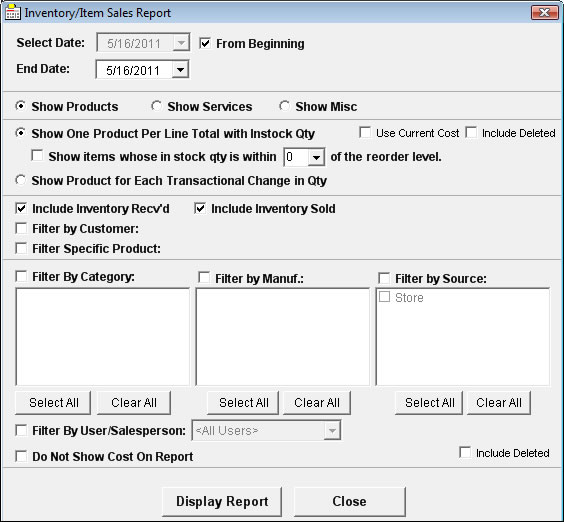
Step into the realm of informed decision-making with our robust reports section, a gateway to comprehensive insights into your sales and inventory landscape. The focal point of this versatile interface is inventory tracking, revealing items at reorder levels and shedding light on the cost and profit dynamics of sold items. Whether you seek a macroscopic view through grouping items into totals or a microscopic analysis of quantity changes, this screen accommodates your data needs with precision. Beyond inventory, the sales report feature takes center stage, spotlighting the items within specific sales orders and providing a lens to scrutinize your business's transactional patterns. The power to filter data refines your focus, enabling you to zoom in on specific facets that hold significance. In this symphony of data, you hold the conductor's baton, orchestrating insights that resonate with strategic resonance, turning numbers into actionable strategies and sculpting a harmonious path to growth.
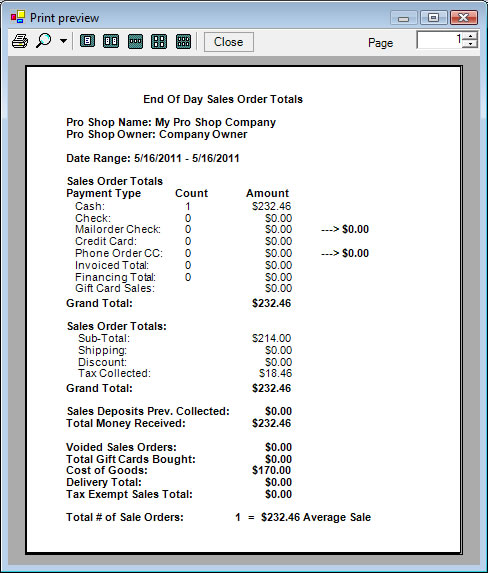
Below is another sample report called "End of Day Sales Order Totals" Report:
Below is another sample report called "End of Day Sales Order Totals" Report:
End of Day Sales Order Totals
POS Pro Shop also has the ability to connect to your AKM Pro Shop customer database.
That way when a customer walks in and wants a ball drilled for example, you enter his bowler and hand information in AKM Pro Shop.
From there you can browse his name from POS Pro Shop, create a sale and print a receipt.
Also keep in mind, this software, by itelf, will work in other industries as well not just the bowling pro shop industry. Just be sure to download and evaluate our demo to be sure it fits your business needs!
In order for POS software to work with a cash draw, you will need to be able to click a shortcut or run a command to open the cash draw first. This is set up through your cash draw software! You then program the cash draw button by copying that command into our settings!
Also keep in mind, this software, by itelf, will work in other industries as well not just the bowling pro shop industry. Just be sure to download and evaluate our demo to be sure it fits your business needs!
In order for POS software to work with a cash draw, you will need to be able to click a shortcut or run a command to open the cash draw first. This is set up through your cash draw software! You then program the cash draw button by copying that command into our settings!
POS Pro Shop Software Price: $239.00
*** There are no yearly fees with our software ***
| Pro Shop Name: | |
| Pro Shop Owner: |
*** Orders will be fulfilled through a downloadable email link instead of post office mail ***
*** We ask for your phone # in case we need to contact you for any installation support ***
*** Please allow up to several hours for us to prepare your order and send you the email link ***
Purchase Both POS Pro Shop and AKM Pro Shop Together!
Software Combo Price: $429.00
| Pro Shop Name: | |
| Pro Shop Owner: |
*** Orders will be fulfilled through a downloadable email link instead of post office mail ***
*** We ask for your phone # in case we need to contact you for any installation support ***
*** Please allow up to several hours for us to prepare your order and send you the email link ***
Contact us for our Point-of-Sale software for additional industries/businesses
 Contact Us! |
 Request Demo! |
 Buy Now! |
| System Requirements: | ||

|
Works on Windows 98, 2000, XP, Vista, Windows 7/8/10/11 Also Works on Microsoft Windows Surface Tablet with Windows 8 Hard Drive (with a minimum of 500MB of free space) 128 MB or more of RAM Mouse/Printer Recommended Standard VGA Monitor or more |

|